🦻
Creating Paging Groups
On FreePBX we can create four types of paging groups. They are incredibly straightforward and easy to set up. First navigate to Applications > Paging & Intercom
Click Add Page Group
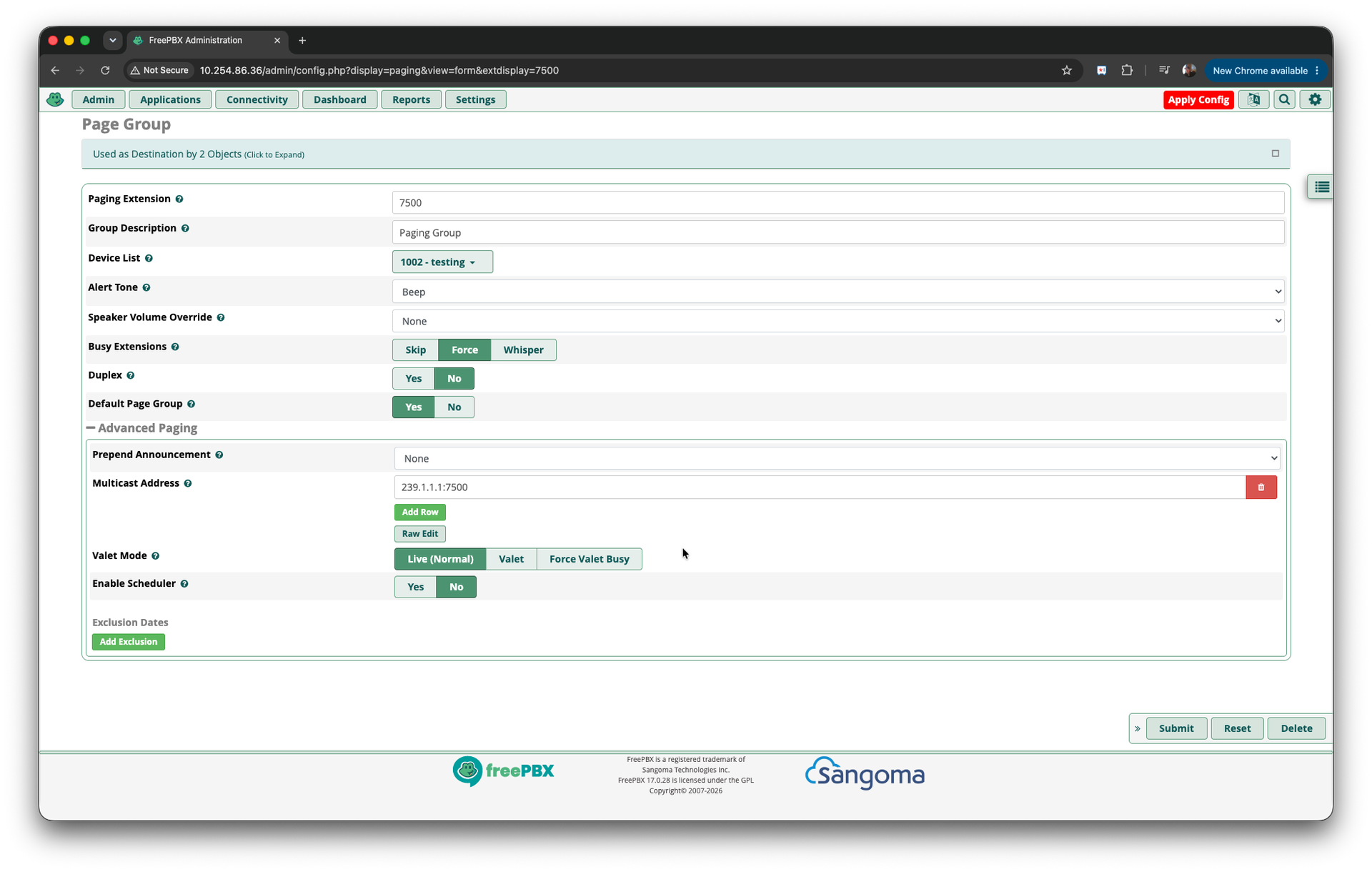
Settings
This will be a standard paging group. So it will broadcast what is spoken from the calling handset on the OpenScape Business.
- Paging Extension : 7500
- Group Description : Paging Group
- Device List : (you can leave blank if only multicasting. If you have SIP extensions also on the FreePBX you can add them here).
- Alert Tone : Beep (this is default)
- Busy Extensions : Force
- Duplex : No (Note : You can have duplex paging groups)
- Default Page Group : Yes (you must have a default group so do this for your first group)
- Advanced Settings
- Prepend Announcement : None (see adding announcements)
Multicast Address - Click Add row then
- 239.1.1.1:{port} - in example :7500
- You can specify multiple multicast addresses. We recommend the port number matches the paging group number for ease of setting up multicast list ening devices.
- Valet Mode : Live (Normal)
- Enable Scheduler : No